Dictation used to mean cleaning up your own mess. You spoke, the software transcribed faithfully (every “um,” every false start) and you spent as long editing as you would have typing from scratch. That changed when AI entered the equation.
I have spent a few days reviewing the dictation tools available in Australia in 2026. What surprised me: after forty years of thinking through my fingers, from typewriter to mainframe to personal computer, I may finally have a viable second mode.
What changed in dictation
The apps that existed even two years ago were transcription tools. They converted sound to text and they did it faithfully, including every false start, every “um,” every moment where you corrected yourself mid-sentence. The output required extensive editing to become usable.
The current generation is different. Built on large language models, these tools interpret intent rather than transcribe sound. They add paragraph breaks where thoughts shift. They format lists when you are clearly enumerating points. They correct spelling and strip verbal filler without losing substance.
The difference matters. Transcription gives you raw material that needs shaping. Interpretation gives you something closer to a draft.
The Australian options (with real prices)
Finding accurate pricing is its own small research project. I use a Mac and iPhone, so my investigations focus on those platforms. Here is what exists for Australian consumers in Jan 2026.
Whisper Memos uses OpenAI’s Whisper engine and includes Apple Watch integration, useful for capturing thoughts on walks. Around A$15 monthly with no hard word cap. This is the one I am currently testing. https://whispermemos.com/
The addition of Apple Watch widget is a bit Dick Tracey. Helpful when driving. Dictate as you drive and arrive to well formatted email and summary. iOS/Apple Watch https://whispermemos.com/
Willow Voice provides similar AI-powered formatting with a focus on context-aware editing. Free tier is 2,000 words per week; paid runs A$15 monthly or A$144 annually. Mac/iOS/Windows. Has offline mode. https://willowvoice.com/
Wispr Flow works across iPhone, Mac and Windows as a system-wide voice keyboard. Free tier offers 1,000–2,000 words per week; Pro removes that limit for about A$20 monthly or A$192 annually. https://wisprflow.ai/
Superwhisper offers both cloud and local processing options at a lower price point: A$12.49 monthly, A$124.99 annually, or A$368 one-time for lifetime access. (Figures converted from US$ so will vary over time) Mac/iOS https://superwhisper.com/
Paying for a ‘lifetime’ licence seems risky in a category which is still evolving. Perhaps not all providers will survive.
I’m still researching options. I don’t think there is one killer app that will work best for everyone. It’s good they offer these free trials.
Two problems dictation solves
I find myself reaching for these tools in specific circumstances.
The first is walking. There is something about movement that loosens thinking, and I have long returned from walks with ideas that evaporated the moment I sat at a desk. The ability to speak those thoughts aloud, trusting the AI to impose structure, changes what a walk can produce.
The second is evening fatigue. Late in the day, the connection between brain and keyboard degrades. The thoughts are present; the physical act of typing them becomes effortful. Dictation offers an alternative path when the primary route is blocked.
Neither situation requires replacing typing entirely. They require a supplementary mode that works when typing does not.
The cognitive challenge
Here is what I did not anticipate: dictating is a different kind of thinking.
When I type, I build sentences word by word on the screen. I can see the structure forming, adjust as I go, backtrack without cost. The screen is a canvas I paint on incrementally.
When I dictate, I need to hold the whole thought (or at least a whole paragraph) in my head before I begin. The AI will clean up my hesitations, but it cannot restructure a thought I have not yet formed. Speaking requires committing to a direction before I know where it leads.
After forty years of one mode, this is genuinely difficult. My brain wants to compose on the fly and dictation does not work that way.
The experiment
I do not know whether I will become fluent at dictation. The romantic possibility is that it unlocks vast new productivity: all those walks converted to drafts, all those tired evenings reclaimed. The more likely outcome is incremental, a useful tool for specific situations rather than a transformation of how I work.
But the technology has crossed a threshold. For the first time, speaking to a machine and receiving polished text is possible. The friction has dropped low enough to make the experiment worthwhile.
Who knows how much more voluminous I might become. Watch out, as they say.
==
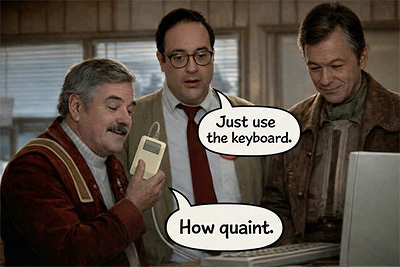
Bonus: The scene pictured is from Star Trek IV: The Voyage Home (1986) IMDB rating 7.3/10. The scene shows Scotty, returned to current time earth, saying “Hello computer”, getting no response, he picks up the mouse and tries to talk to computer through that. (Youtube clip of the scene)