I mow my own lawn. Always have. It’s not complicated, but getting the timing right is surprisingly fiddly.
You need dry grass, reasonable temperature, low wind and no rain on the horizon. You also need a free block in your diary long enough to actually do the job. In Melbourne, where a day can serve up four seasons, these conditions don’t always line up.
I’d been meaning to automate this for a while. Last weekend I sat down with Claude and built it in a single session.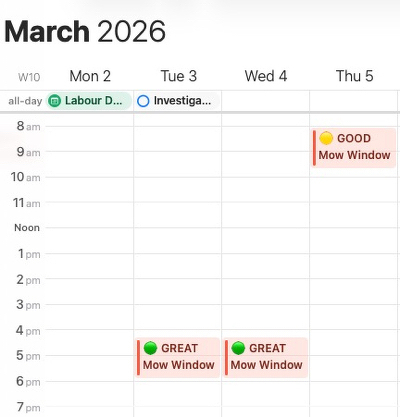
What it does
Mow or No is a Google Apps Script that runs every morning at 6am. It checks the 5-day weather forecast against my Google Calendar and drops a colour-coded event into a dedicated “Mow or No” calendar when conditions align.
Green means great. Yellow means good. Cyan means acceptable. No event means don’t bother.
Each event includes a weather summary in the description: temperature, rain probability, wind speed, humidity. Glance at it and decide.
The script recalculates every morning. If the forecast shifts overnight, stale events are cleared and replaced. No manual checking required.
The decision logic
The system uses hard gates and soft scoring. Any gate failure kills the window entirely.
The gates: temperature must be 25°C or below. Rain probability under 30%. Wind under 30 km/h. No rain in the prior six hours (wet grass is miserable to cut and clumps everywhere).
Passing windows then get scored on ideal conditions. Temperature between 15°C and 22°C earns two points. Low humidity and minimal rain risk add one each. Maximum score is four.
UV awareness
“Only mad dogs and Englishmen go out in the midday sun.” - Noel Coward
After the first pass I realised that this script should avoid, best it can, the full blast of midday sun. Claude suggested a sensible method of working this through.
The script fetches sunrise and sunset times from the weather API, calculates solar noon, and defines a peak UV avoidance zone of two hours either side. It then collects all passing windows for each day and picks the one furthest from peak UV, with a bias toward morning.
The clever bit: this adapts seasonally without any configuration. In late February, solar noon is around 1:20pm and the avoidance zone runs roughly 11:20am to 3:20pm. In June it tightens to 10:20am to 2:20pm as the days shorten. The script just follows the sun.
The sliding window
The first version of the script assessed each free calendar block as a single chunk. A free block from 8am to 6pm would get evaluated against the whole day’s weather. If rain was forecast at 3pm, the entire block failed, even though 8am to 10am was perfect.
Diagnostics made this obvious immediately. Sunday’s forecast showed clear skies until 2pm, then 80% rain probability. The script was rejecting the whole day.
The fix: slide a 90-minute mow window across each free block in one-hour steps. Assess each window independently. Pick the best one. Sunday’s 8am slot passed with flying colours while the afternoon correctly failed.
How I built it with Claude
The whole project was conversational. I described what I wanted, Claude proposed four implementation options (iOS Shortcuts, Flask web app, Google Apps Script, Claude API briefing) and I picked Google Apps Script for its zero-hosting simplicity.
Claude generated the first working version. I pasted it into Google’s script editor, configured my API key and calendar ID and ran it. Nothing appeared in my calendar.
This is where the process gets interesting. Rather than guessing, Claude wrote a diagnostic function that traced the entire decision chain: weather data, calendar free blocks, forecast overlap and gate assessment. The diagnostics immediately showed the problem (running at 9:30pm, no forecast data overlapping the 8am-6pm window for today). Tomorrow’s data was fine but exposed the single-block assessment problem described above.
Each issue surfaced through diagnostics, got discussed and fixed in the next iteration. The UV awareness came from Claude proactively suggesting it when I asked about scheduling bias toward cooler parts of the day. I hadn’t considered using sunrise/sunset data for seasonal adaptation.
Three versions in one session. Each one better than the last, each improvement driven by real diagnostic output rather than speculation.
What I learned
The pattern here is the same one I found building Felix (my bookmark manager): describe the problem clearly, let Claude generate the first cut, then iterate based on actual results. The diagnostic-driven debugging loop is where the real value sits. You’re not debugging code. You’re debugging decisions.
Google Apps Script turned out to be the right call. Zero hosting, zero cost, runs on Google’s infrastructure and writes directly to the calendar I already check every morning. The OpenWeatherMap free tier handles the two API calls per day without breaking a sweat.
The whole thing is on GitHub if you want to adapt it. Change the coordinates to your location, adjust the temperature gate to your preference and you’re done. Don’t ask me how to adapt to Fahrenheit. I will leave that to the few countries which are stuck in the morass of pre-metric. Remind me again how many chains are in a furlong?
I suspect the “collect all candidates, score and rank” pattern applies to far more than lawn mowing. Any decision that depends on multiple external conditions plus personal availability is a candidate. The mowing logic is simple. The framework is not.
Sources:
- Mow or No on GitHub (github.com/tstevenson-3000/mow-or-no)
- OpenWeatherMap API (openweathermap.org/api)
- Google Apps Script (script.google.com)