A friend of mine, let’s call her Jane, runs a marketing consultancy. Fifteen years in, small team, strong client list, had used Claude for chat only. I offered to spend an hour showing her what’s possible now we’re well beyond that.
Wednesday night I realised winging a 75-minute demo next morning would burn too much time on navigation and too little on value. I opened Claude Cowork, uploaded a brief I’d quickly hacked together from emails and went on with my evening. In just a short time Cowork literally worked magic!
What I asked for
The brief asked Claude to build everything I’d need to run the session.
A slide deck in the consultancy’s own visual style. Speaker notes with live demo prompts. A subscription recommendation with Australian pricing. A 30/60/90-day roadmap. A homework checklist under two hours of her time. And a custom voice skill distilled from the consultancy’s website, so that anything Claude drafted for them afterwards would write in their voice rather than generic consultancy mush.
The live demo scenarios were the hard part. Three of them.
Synthesising customer feedback from focus groups where the inputs are a mess (handwritten notes, scanned post-its, voice transcripts). Identifying adjacent niche markets for a consultancy that mainly grows through word of mouth. Turning around new-business proposals at pace using the consultancy’s distinct voice.
Plus a home scenario. A family with three sons aged 16, 14 and 12 trying to race through a busy Melbourne week without losing their minds.
What came back
Thirty-eight minutes later, Claude had produced three coordinated artefacts.
A 28-slide PowerPoint deck in the consultancy’s visual style. Three-act structure (foundations, deep dives, next steps), embedded demo prompts, subscription comparison, roadmap, homework and a closing slide. All laid out. No placeholders.
A 12-page facilitator Word document. Per-slide speaker notes, copy-and-paste prompts for each live Claude moment, full resource section with hyperlinks, agenda table with time budgets, pre-meeting checklist.
A voice skill as a separate markdown file. One hundred and fifty lines of vocabulary, structural moves, tone calibration (warm not saccharine, frank not blunt) and before-and-after examples. Drop it into the Claude skills folder and the output sharpens on the next prompt.
All of this produced in 38 minutes on a Wednesday evening while I busied myself with other things. I slept well knowing Thursday’s session was effectively ready.
Small cracks, and the choice not to polish
Opening the files felt like being a kid at Christmas. Wow. On the mark. Well past “useful first draft” and into “this could ship”.
Three minor issues. The brand header sat against the logo in a way that slightly muted it. One date was wrong (my fault, I’d put it in the brief that way). A handful of slides had text sitting a fraction too close to decorative elements. Small stuff.
I fixed none of it.
I left the PowerPoint exactly as Claude delivered it. The whole point of the session was to show what this tool actually produces on a brief and polishing would quietly have sanitised the demo into something slicker than the reality. Jane saw the real output, not a glossed version of it.
Arthur C. Clarke’s third law kept running through my head: any sufficiently advanced technology is indistinguishable from magic.
What one demo became
The family scheduling exercise is the easiest of the four demos to show, and it’s a useful window into how deep a single session can go. What started as “help us run a busy week with three boys” became something more interesting as we engaged with Claude.
Three pieces, working together.
A proper calendar architecture. Not “use a shared calendar”, which is the generic advice. Claude came in with seasoned experience on how to build and connect a tier of Google Calendar accounts to cater for the different needs across a family of five. Who sees which layer. Who can edit. Which child maintains their own calendar with partial visibility back to the parents. Colour coding, sharing rules, and the quiet discipline of if it’s not on the calendar within the hour, it didn’t happen. This is the sort of advice you’d pay a family coach serious money for. It arrived inside a minute.
A 15-minute Sunday meeting. The Sync — a weekly family huddle with its own guide. The clever move: a second version written directly to the kids, opening with “Hey you three” and framing the ritual as the family’s shared discipline rather than a compliance exercise. That distinction matters when two of your kids are negotiating their teen years and own identities. The meeting runs against a short template to keep it on the rails.
The week at a glance. A one-page live HTML view showing the coming week on the kitchen iPad. Who’s where, when, who’s driving. Updates when the calendars change.
This is not what “a family scheduling plan” usually means. This is a household operating system, designed for a real family with real teenagers. One exercise, inside one session, unlocked what would have been a weekend of work with a human family coach.
The late encore
Fifteen minutes before the session was due to start, I had another thought. Always dangerous.
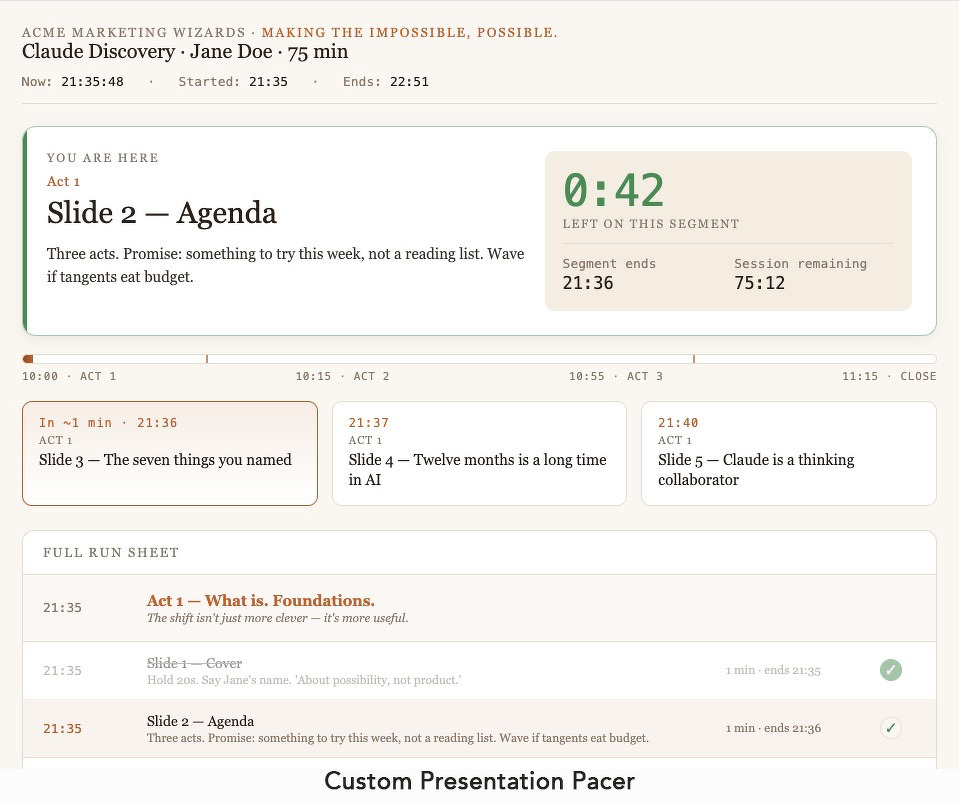
The speaker notes carried a time budget per slide. How was I going to hold pace without glancing at my laptop clock every thirty seconds and looking disengaged on the Zoom call?
“Take the Word guide. Pull the time budget per slide. Build me an interactive HTML dashboard I can run on my iPad. Something I can see at a glance."
First build came back in dark theme (Claude defaulted to dark, because most developers want that). Wrong for this use case. “Light theme, clean.” Rebuild in under a minute.
Next problem. An iPad doesn’t host HTML well. You can’t reliably open a local .html from the Files app and have it render. I raised this with Claude. Three suggestions came back. The fastest was Netlify. Drag the folder onto the browser, get a live URL, open on the iPad. Free. Thirty seconds to deploy.
Ten o’clock came around. The Custom Presentation Pacer ticked silently on the iPad beside my laptop. It worked really well to keep me on track. Not too fast, not too slow.
The session
Seventy-five minutes became ninety, in the good way.
The live Cowork demos landed. The family scheduling exercise produced the operating system I described above, on screen in front of Jane. The adjacent markets conversation named sectors and organisations neither of us had thought about before the session started. The voice skill was the quiet hit. Jane saw her own website phrasing come back in a draft email inside 90 seconds and went quiet for a moment.
Afterwards I sent her the full pack. Deck, speaker notes, voice skill, zipped. And an email explaining what she’d just watched: a Claude session prepared by Claude, deliberately unpolished, delivered with a real-time HTML tracker that Claude also built from the same source materials fifteen minutes before we started.
The meta-point landed. Jane got it straight away.
The point
There is a version of this story that is about the prompt I wrote. A better version is about everything else.
38 minutes.
One brief, one upload, one evening. In less time than it takes to cook dinner, Claude read a brief, asked a handful of clarifying questions and produced a 28-slide deck, a 12-page facilitator document and a 150-line voice skill — three separate formats, one coherent voice, no placeholders, no lazy defaults.
Claude didn’t replace my judgment. It did everything a competent producer-designer would have done over three full days of effort. In the time it took me to cook dinner and watch half an episode of something.
The magic isn’t that Claude writes a deck. Lots of tools write decks now. The magic is the coordination. A deck and its matching speaker notes and a voice skill that makes both sound like the client. Plus, when the family scheduling exercise happened on Thursday, another household-scale operating system, designed from scratch, inside the session window.
Cowork demonstrated Cowork. I pointed at the screen and said watch this.
Sources:
- Claude Cowork (claude.com)
- Netlify (netlify.com)
- Arthur C. Clarke’s Third Law — from Profiles of the Future, 1973