I built Felix myself. With a lot of help.
The vibe coding workflow goes like this: you have an itch, you describe it to Claude, you argue back and forth about implementation details you half-understand and Claude half-understands, and eventually something exists that didn’t before. Felix exists this way. A small personal app I’ve been nudging and extending for a few months, named for Felix the Catalog (a nod to the ancient Aussie penned cartoon series).
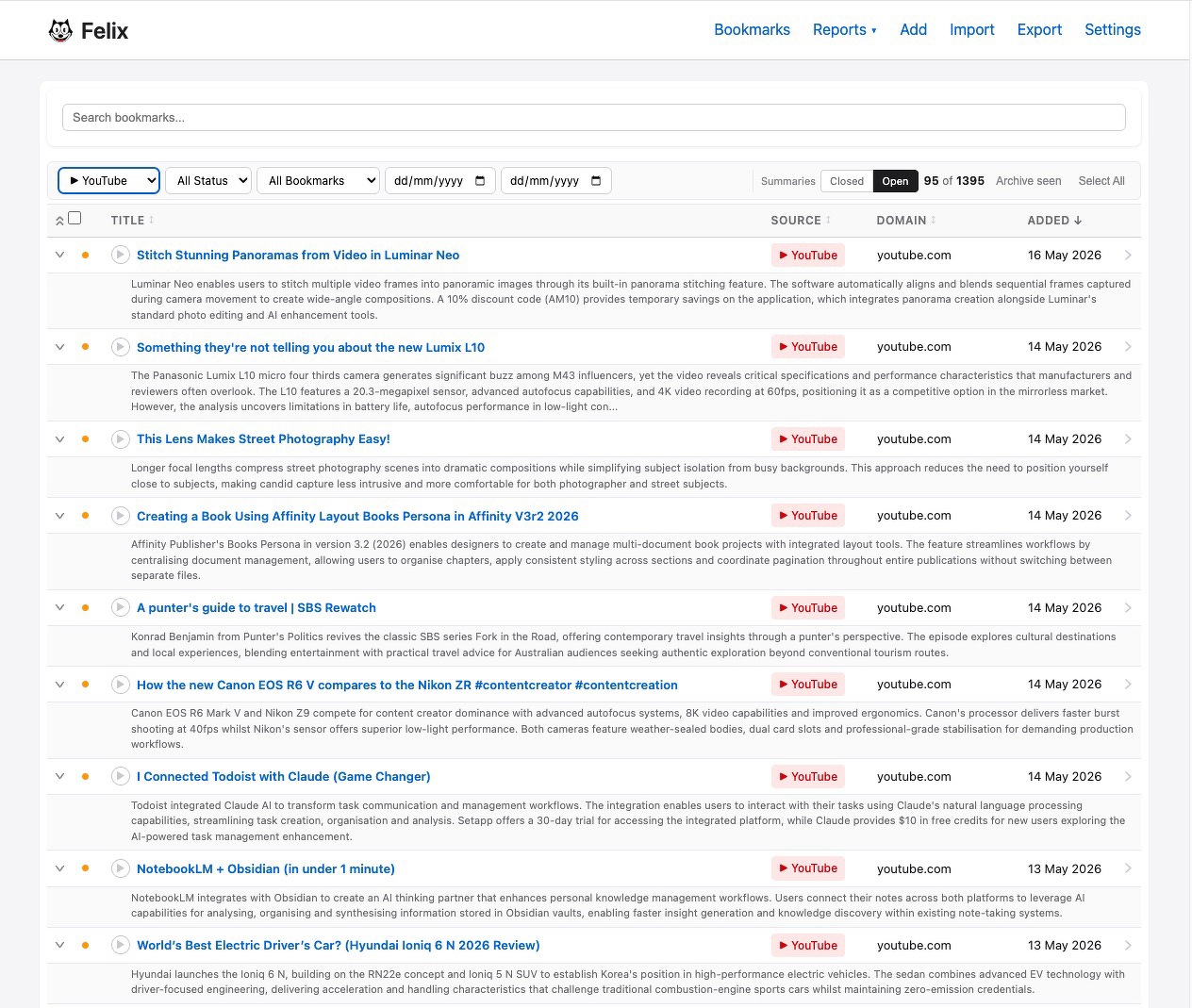
The original brief was modest. A way to manage all the bookmarks I was accumulating by starring items in RSS lists I read. The problem with list apps is they’re either too simple to be useful or too powerful to be fast. Felix landed exactly where I needed it.
I watch a lot of YouTube clips. Not the algorithmically-served stuff, not the let’s-play culture, not the commentary channels that fill an hour and say very little. Clips - the short, specific kind. An interview that crystallises something. A demonstration of a skill. A moment from a press conference you’ll quote for twenty years. The internet is full of them and they are almost impossible to curate with any of the tools that exist for the purpose.
Not many people appreciate that each YouTube channel can be subscribed to as a RSS feed. So now I have a flood of YouTube links pouring into my RSS reader. When I star them to view later on, I end up with yet another large pile of stuff to manage.
My previous system was a starring habit that decayed into a list of 200 videos I’d never return to and couldn’t search. A graveyard for good intentions.
Felix solved it. Not because I initially set out to design it for that it. Because the low-friction input, the clean interface and the complete absence of any social layer made it obviously right for the job. I started dropping YouTube links in there when I didn’t want to lose something. Within a few weeks the pattern had calcified into behaviour.
Felix is now my YouTube watchlist. Properly. It’s where I park the clips I want to think about, return to or quote. It handles the queuing problem that YouTube itself handles badly for anyone who isn’t chasing the algorithm.
The clips accumulate, and Felix creates a short summary for each of them, so they make a lot more sense than perhaps you can derive from even reading a hash tag written info on the original clips. Now I’ve implemented Tailscale at home and on the road. I can sit in the lounge room with my iPad, reviewing Felix, which is running on my Apple MacBook Pro in the study, and happily skip through my backlog of YouTube clips.
A few weeks ago I wrote about Geir Isene, who replaced his entire computing environment with software he built himself. Felix is a much smaller gesture in the same direction. But I feel the same thing he described - the satisfaction of a tool shaped to your specific contours rather than designed for everyone and therefore perfect for no one.
Software built for one person doesn’t have to justify its roadmap to a product committee. It just has to work for that person.
Felix does. Even though - especially because - that’s not quite what I set out to build.
RSS - Short for Really Simple Syndication. A standard format that websites use to publish a feed of their updates. When a site supports RSS, you can subscribe to it and receive new content automatically in a feed reader - no algorithm, no ads, no platform deciding what you see. YouTube channels support RSS natively, which means you can follow creators directly without touching the YouTube app. aboutfeeds.com is the clearest explanation of what RSS is and why it matters.
Tailscale - A zero-configuration mesh VPN that connects all your devices into a private network, wherever they are. Your phone in a cafe, your laptop at a client’s office, your iPad on the couch - they all see each other as if they’re on the same local network. Which means you can run an app on your home machine and access it securely from anywhere. It is $0 but priceless in value.