
Yesterday I built an app. My first ever, not counting some AppleScripts and HyperCard stacks back in the day. I scoped out the requirements during a 10-minute walk, dictating into my iPhone. After running errands I cleaned up the notes at my Mac, fired up Claude Code, and had a working application by evening.
The name comes from Felix the Cat and his “Magic Bag of Tricks” - classic Aussie made cartoon.
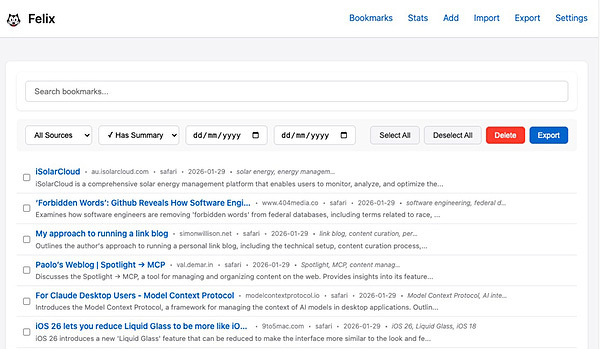
My Felix magically collects bookmarks from various sources and transforms them with AI assistance.
The problem I was solving
I’m an avid RSS reader. My Feedbin tracks 100+ feeds covering technology, design, writing and professional interests. I star articles I want to revisit. Over time I’d accumulated 750+ starred items with no way to search, organise or actually use them.
I wanted something that would automatically pull my starred items, summarise each one so I can quickly remember what it’s about, extract keywords for filtering and discovery and export weekly to Obsidian where I do my writing.
Existing bookmark managers didn’t fit. Instapaper, Raindrop.io and similar services are cloud-based, require monthly subscriptions and don’t integrate with my RSS reader or provide AI-powered summaries the way I wanted them.
What Felix the app does
Three things:
It collects bookmarks from multiple sources (primarily my Feedbin starred items, but also Safari’s reading list and a browser bookmarklet for one-click saving).
It enriches them with AI: Claude generates concise summaries (350-450 characters) and extracts 3-7 specific keywords for each bookmark.
It exports them to my Obsidian vault or other formats for writing and reference.
The app runs entirely locally on my Mac. All data stays in a SQLite database on my machine.
My role in the process
This wasn’t me writing code while Claude watched. It was genuine pair programming where I directed and Claude implemented.
I served as product manager, architect and quality tester. I defined requirements; exactly what features I needed, how the interface should behave, what the export formats should look like. I made technical decisions. Chose the frameworks and database. Designed the workflow.
After each feature, I tested in the browser, reported bugs and requested refinements. I refined the AI prompts until the summarisation produced the style I wanted, no clichés like “This article explores…”
The timeline surprise
Claude estimated 15-20 hours based on the five implementation phases we’d agreed. We did it in just over 6 hours. From an idea on a walk to a polished implementation. I was quite hands-on having to keep an eye on Claude and respond to queries and review work. But it was an easy management role. No need for me to do any debugging.
Results after overnight use
750 bookmarks imported from Feedbin. About 90% AI success rate (9 in 10 bookmarks successfully summarised). Processing speed around 30-60 seconds per batch of 10 bookmarks. Cost roughly A$0.50 per month for the Claude API. Database size 2MB.
The AI-generated summaries are consistently high quality. They capture the essence without clichés, and the keywords are domain-specific rather than generic terms like “guide” or “tips”.
What I learned
AI pair programming is real. Claude Code wasn’t just autocomplete. It understood my architecture decisions and implemented complex features end-to-end. Claude Code made valuable suggestions and was super responsive to my ideas. I redesigned the interface by hacking a screenshot and uploading it. Claude followed that lead.
Local-first has value. No subscription fees, no privacy concerns, instant performance, works offline.
AI-augmented content is powerful. Having summaries and keywords makes 750 bookmarks actually usable instead of a digital junk drawer.
Build for yourself first. Solving my own problem produced a tool I will use daily. Generalising can come later.
The limiting factor has shifted from technical skill to imagination. It’s really quite revolutionary what could be achieved in 6 hours. First core working code in less than an hour and then adding features and refining. I’m stunned.
I cover the technical implementation details in Part 2 for those interested in how it was built.
Glossary
RSS — A standard format that websites use to publish updates. When a site has an RSS feed, you can subscribe to it and receive new articles automatically, without visiting the site or relying on social media algorithms to surface content. Most blogs, news sites, and podcasts offer RSS feeds. ~What is RSS? /AboutFeeds/
RSS Reader — An app that collects all your RSS subscriptions in one place. Instead of checking dozens of websites individually, you open your reader and see everything new. It’s like email for websites — content comes to you. I use NetNewsWire] on Mac, which is free and open source.